
Shopify Conversion Tracking That Actually Drives Revenue
- Doc. N°
- ELMTM-004
- Filed
- Rev.
- November 6, 2026
- Class
- Strategy & Systems
- By
- Ethan Leard-Means
- Read
- 8 min
The minimal reliable setup is this: treat Shopify orders as your financial ground truth, install each ad pixel once through a single method, enable enhanced conversions, and add a server-side feed when your spend and accuracy needs justify it. Before anything else, place a test order and confirm the transaction ID and order value appear in Shopify Admin, in GA4, and in your ad platform's test tools.
- Shopify is the ledger. Ad platforms provide optimization signals, not accounting.
- One install method per pixel. Duplicate installs are a very common cause of inflated conversion counts.
- Enhanced conversions and consent mode help recover signal lost to cookie restrictions.
- Server-side tracking earns its cost once browser signal loss is materially distorting the decisions your ad spend depends on.

What events and parameters tracking actually requires
Most stores track too little or track the wrong things. The events that matter for ad optimization are purchase, add to cart, begin checkout, view item, and lead (for service-adjacent funnels). Newsletter signups and upsell acceptances are useful secondary signals.
The purchase event carries the weight. It should include:
- Transaction or order ID, which lets platforms deduplicate browser and server events for the same order
- Value and currency, which make return on ad spend calculable and keep multi-market reporting consistent
- Product ID or SKU, variant, and quantity
- Coupon or discount code
- Hashed customer email, where consent allows
- Tax and shipping, when available
| Event | Key parameters | Why it matters |
|---|---|---|
| purchase | order ID, value, currency, product ID, quantity | Deduplication, ad return, revenue attribution |
| add to cart | product ID, value, currency | Funnel drop-off analysis |
| begin checkout | value, currency | Checkout friction |
| view item | product ID, value | Product interest signals |
Raw conversion rate says little about profitability on its own. Average order value (revenue divided by orders), revenue per visitor (revenue divided by sessions), and return on ad spend (attributed revenue divided by ad spend) say whether a campaign is profitable, not just busy.
Setting it up end to end
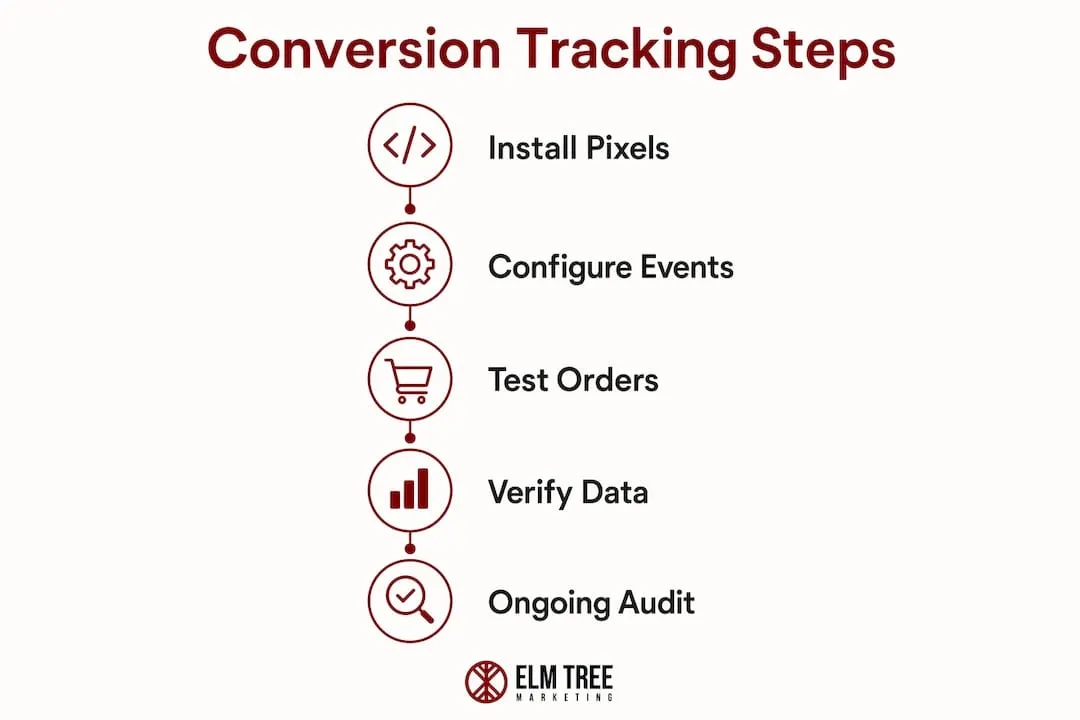
Work in this order:
- Pick the primary conversion event. For most stores, a completed purchase.
- Audit for existing pixels. Check theme files and any legacy checkout script fields for hard-coded pixel snippets, and remove them before adding anything new.
- Connect GA4 and Google Ads through Shopify's Google channel app or through Google Tag Manager. Not both.
- Install the Meta pixel once, through either the Meta channel app or a tag manager. Not both.
- Enable enhanced conversions. Google describes enhanced conversions as sending hashed first-party conversion data, such as email addresses, using a one-way hashing algorithm, to improve measurement accuracy. Configure consent mode alongside it.
- Use Customer Events for checkout tracking. Shopify's Web Pixels API runs pixels in a sandbox and exposes standard events, including checkout progression events. Custom pixels are configured in the Shopify admin's pixel manager.
| Implementation path | Speed | Control | Best for |
|---|---|---|---|
| Native channel apps | Fast | Low | Small budgets, single channel |
| Tag manager, client-side | Moderate | High | Multi-channel stores with developer access |
| Customer Events | Moderate | Medium | Checkout tracking without theme edits |
| Server-side tagging or Conversions API | Slowest | Highest | High spend, accuracy-critical |
For developers: a purchase data layer push on the confirmation page should carry the order number as the transaction ID, the order total as a decimal in the store's currency (Shopify's Liquid money values are stored in minor units, so they need converting), the currency code, and an items array built by looping over the order's line items with product ID, title, quantity, and unit price. If you move to a tag manager, remove every hard-coded pixel before publishing, and make sure the same ID is used on both browser and server events so purchases are counted once.
Client-side or server-side
Browser-based tracking is fast to deploy and costs nothing extra. Its weakness is that ad blockers and browser privacy features such as Safari's Intelligent Tracking Prevention can stop events reaching Meta or Google. The result is under-reported conversions and bidding algorithms optimizing on incomplete signals.
Server-side tracking sends the purchase event from a server rather than the visitor's browser. Google describes server-side tagging as a way to measure user activity wherever it happens, with benefits for page performance, privacy controls, and data quality. It runs alongside the browser pixel rather than replacing it, and deduplication depends on both sending the same event or transaction ID.
A sensible progression by store stage:
- No paid ads: Shopify Analytics is sufficient.
- Light spend: native app integrations plus enhanced conversions.
- Multi-channel spend: a tag manager with enhanced conversions and consent mode.
- High spend where accuracy drives budget decisions: a hybrid of browser pixel plus server-side events, deduplicated by order ID.
There is no universal spend threshold. The trigger is when the gap between Shopify and platform-reported revenue is large enough, and persistent enough, to distort where money goes.
Testing and verification
Ad algorithms train on the data you send them. Bad data produces bad optimization.
Test checklist:
- Place a test order with a real payment method or Shopify's test gateway.
- Open GA4 DebugView, which shows events as Analytics collects them, and confirm the purchase event fires with the right transaction ID and value.
- Confirm the purchase appears in Meta's test events tool with matching value and currency.
- Check for duplicates: the same transaction ID twice within seconds is a double-fire.
- Confirm enhanced conversions are receiving hashed email.
- Compare the order in Shopify Admin against what each platform reported.
Reconciliation columns to maintain daily: date, Shopify orders, Shopify revenue, platform conversions, platform revenue, the difference, the difference as a share of Shopify revenue, and the likely cause (duplicate, missing ID, modeled conversions, or attribution window mismatch).
Why Shopify and ad platforms disagree
They always will. The question is whether the gap is explainable. Divergence comes from four places: different default attribution windows across platforms and campaign types, view-through credit for impressions that preceded a purchase, platform-modeled conversions that fill in missing browser signal, and genuine double-counting.
Treat platform conversions as directional. Establish what a normal gap looks like for your store over a few weeks, then set an alert for days that move well outside it. When one fires, look for duplicate transaction IDs, missing order IDs, and currency mismatches first. A daily automated check, a weekly review, and a monthly sample-order audit is a workable cadence. Attribution visibility is the broader version of this discipline.
Failures that quietly break data quality
- Double-fire pixels. An app-installed pixel plus manual theme code. Keep one source.
- Missing order ID. Events fire before the transaction identifier is available.
- Value mismatches. Rounding or currency formatting differences. Pass value as a decimal in the store's base currency.
- Post-purchase upsell apps. A second order can re-fire the purchase event. Confirm deduplication handles it.
- Legacy checkout scripts. Old pixel code left in checkout settings fires alongside new tags.
- Incomplete enhanced conversions. Hashed email not passed with the conversion.
Segment conversion data by device, geography, and new versus returning customers. Tracking failures often concentrate on mobile or in specific regions.
Tracking decays
Setup is not a one-time project. Shopify changes its checkout. A new upsell app ships. Someone edits theme code and reintroduces a pixel, or adds a measurement ID in a second place. None of these changes announce themselves; the conversion count drifts and the bidding algorithm adjusts to the wrong signal.
This matters more for fitness, wellness, and restricted-category brands, where acquisition is expensive, ad access is limited, and margins depend on knowing which campaign drove a real purchase. The fix is not a more complex setup. It is a verification cadence: reconciliation, audits, and automated gap alerts.
Frequently asked questions
What is the fastest way to set up Shopify conversion tracking? Install Shopify's Google channel app for GA4 and Google Ads and the Meta channel app for the Meta pixel. Both cover the purchase event. Verify with a test order before running paid traffic.
Why does Meta report more conversions than Shopify shows orders? Meta counts view-through and modeled conversions under its own attribution window, which credits some sales Shopify records as organic. A persistent gap well above your normal range usually signals a double-fire or missing deduplication.
Do I need server-side tracking? Not immediately. Enhanced conversions and Customer Events recover much of the lost signal for smaller stores. Server-side tracking becomes worth its cost and complexity when signal loss is distorting budget decisions.
How do I stop GA4 counting purchases twice? Use one installation method, the channel app or a tag manager, never both. Check DebugView after a test order and confirm one purchase event per transaction.
Where this fits
Tracking is the measurement layer under every acquisition decision. ELM Tree Marketing treats it as part of conversion work for ecommerce brands, including wellness brands and restricted categories, because a campaign cannot be judged on data that drifts.
If you want to know whether your current setup can be trusted before you scale spend on it, a Growth Analysis examines each stage of your system, tracking included, and puts the fixes in order.